Learn how to transform a creative game idea into a playable prototype by defining core mechanics, selecting a game engine, building essential features, testing gameplay, and improving the experience through feedback.
How to Turn a Game Idea Into a Playable Prototype
Every successful game begins with an idea. It might be an exciting adventure, a challenging puzzle, a multiplayer battle, or a simple mobile game that players can enjoy in their free time. However, transforming an idea into an engaging gaming experience requires more than creativity. Developers must determine whether the concept works, whether the gameplay feels enjoyable, and whether players understand the objectives.
This is where a playable game prototype becomes valuable. A prototype is an early version of a game that demonstrates its essential mechanics without requiring a complete production-ready experience. It helps developers experiment, identify problems, and validate their ideas before investing significant time and resources.
1. Start by Defining Your Game Idea
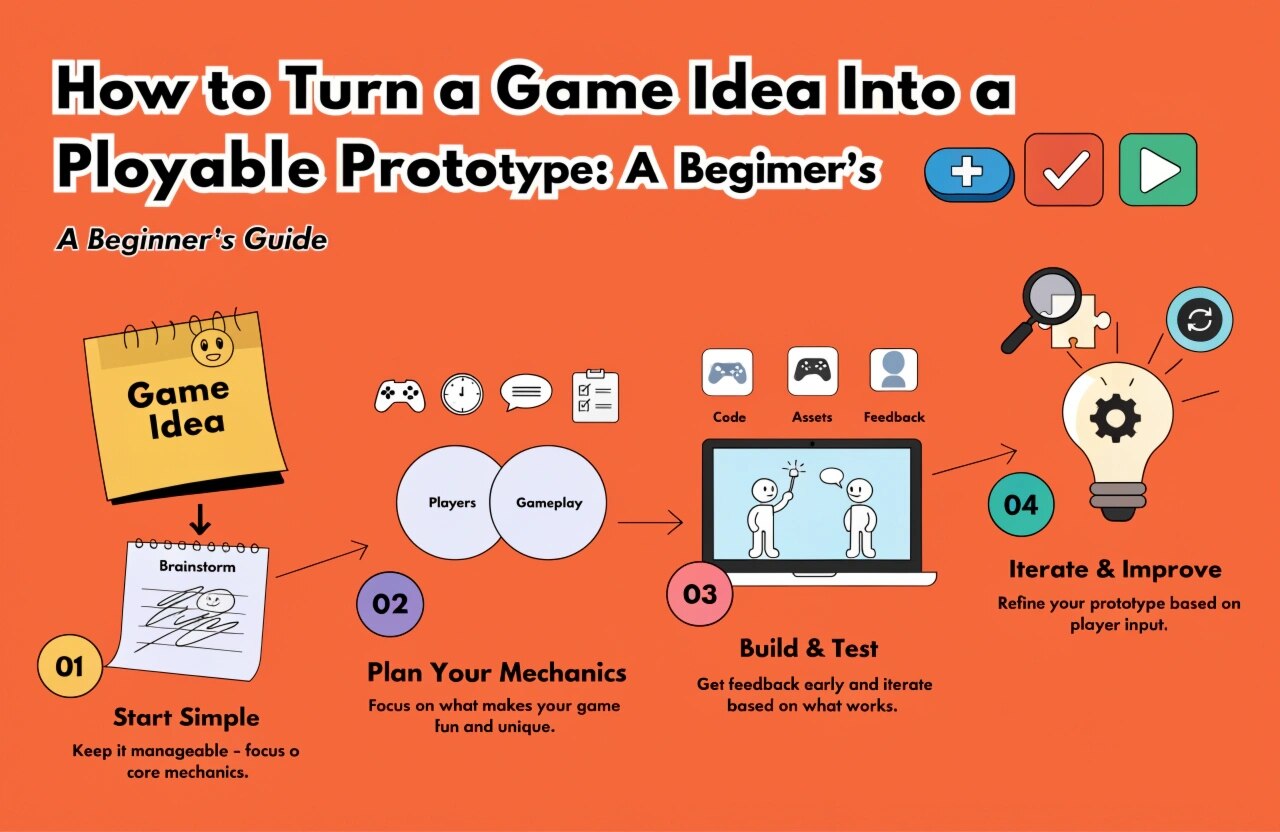
Before opening a game engine or writing code, clearly define your concept. A strong prototype begins with a simple understanding of what the player will do and why the experience should be enjoyable.
Ask yourself a few important questions:
- What type of game am I creating?
- Who is the target audience?
- What is the main objective?
- What makes the gameplay different or interesting?
- What challenge will players experience?
For example, imagine a mobile game in which players control a character jumping between moving platforms. The primary objective might be to reach the finish line without falling.
You do not need a detailed storyline, dozens of levels, or advanced graphics at this stage. Focus on identifying the central idea and the experience you want players to have.
2. Identify the Core Gameplay Mechanics
Gameplay mechanics are the rules and actions that determine how a game works. These include movement, jumping, shooting, collecting items, solving puzzles, or interacting with the environment.
Your prototype should focus on the mechanics that make your game unique.
For a platform game, the essential mechanics might include character movement, jumping, platform collisions, and falling. For a puzzle game, they might include selecting objects, matching patterns, and completing challenges.
Start with the smallest set of features necessary to demonstrate the main gameplay loop.
A gameplay loop is the repeated sequence of actions players perform during a game. For example, players might explore an environment, collect resources, avoid enemies, and unlock the next area.
If this loop is not enjoyable, adding more content will not necessarily improve the experience. Test the basic mechanics first and refine them until they feel satisfying.
3. Choose the Right Game Development Engine
Selecting an appropriate game engine can make prototyping faster and more manageable. The best option depends on your project requirements, technical experience, target platform, and available resources.
Popular game development engines include:
Unity: Unity is widely used for mobile games, 2D and 3D projects, interactive experiences, and cross-platform development. Its component-based workflow and C# scripting make it a useful choice for many beginners and professional teams.
Unreal Engine: Unreal Engine is well suited to projects requiring advanced 3D visuals, realistic environments, and sophisticated rendering. Its visual scripting system, Blueprints, allows developers to experiment with gameplay logic without writing every feature in code.
Godot: Godot is an open-source engine that supports both 2D and 3D development. It offers a lightweight environment for experimenting with gameplay ideas and creating smaller projects.
You do not need to select the most powerful engine available. Choose the tool that allows you to build and test your core mechanics efficiently.
4. Create a Simple Game Design Document
A game design document, or GDD, records the essential details of your concept. For a prototype, this document can be short and practical.
Include the following information:
- Game concept and genre
- Target audience and platform
- Main objective and gameplay loop
- Core mechanics and controls
- Basic level or environment design
- Features required for the first prototype
You can also sketch the user interface, character movement, level layout, or player interactions on paper.
The goal is to establish a clear direction for development. A simple document helps developers avoid unnecessary features and keeps the project focused on its original purpose.
5. Build the First Playable Version
Once the mechanics and tools are defined, start building the prototype. Begin with basic shapes, temporary assets, and simple environments rather than spending time creating polished graphics.
For example, a character can initially be represented by a capsule, enemies by simple geometric shapes, and platforms by basic blocks. These temporary assets allow you to focus on functionality.
Prioritize the essential features:
- Basic player controls and movement.
- The main gameplay mechanic.
- Simple collision detection and interactions.
- A clear objective or win condition.
- A basic failure condition and restart option.
At this stage, the game should be playable from beginning to end, even if the experience is short.
Avoid adding advanced animations, complex sound design, multiple levels, elaborate menus, or monetization systems unless they are essential to validating your concept.
6. Test the Prototype Early
Testing helps determine whether your game idea works in practice. Developers often become familiar with their own designs and may overlook problems that new players notice immediately.
Invite a few people to play your prototype without explaining every mechanic. Observe whether they understand the controls, recognize the objective, and enjoy the challenge.
Pay attention to questions such as:
- Can players understand what to do?
- Are the controls responsive?
- Is the difficulty appropriate?
- Are there confusing or frustrating moments?
- Does the main gameplay loop encourage players to continue?
Collect specific feedback rather than asking only whether someone likes the game.
For example, a player struggling to complete a jump might reveal that the character's movement speed, jump height, or collision settings need adjustment.
7. Improve the Prototype Through Iteration
Game prototyping is an iterative process. Developers build a feature, test it, review the results, and make improvements.
Use feedback to identify the most important issues. Fix gameplay problems before spending time on visual polish.
You may discover that a mechanic is less enjoyable than expected, a level is too difficult, or a different control system would work better. These findings are valuable because they help you make informed decisions before full production.
Maintain a simple list of improvements and prioritize changes according to their impact on gameplay.
If the core concept does not work, consider simplifying it or experimenting with an alternative approach. Changing direction during prototyping is generally easier than rebuilding a nearly finished game.
8. Prepare for the Next Development Stage
Once your prototype demonstrates that the core gameplay is promising, evaluate what is required to develop the complete game.
Review the prototype's strengths, technical limitations, player feedback, and estimated production requirements. Decide which features should be retained, improved, redesigned, or removed.
The next stage might include creating original art and animations, developing additional levels, implementing sound effects, improving performance, or preparing the game for mobile, PC, or console platforms.
Remember that a prototype is not necessarily the foundation of the final codebase. Sometimes, its primary purpose is to validate the design before developers rebuild the systems using production-ready architecture.
Conclusion
Turning a game idea into a playable prototype is one of the most practical ways to begin game development. By defining your concept, identifying core mechanics, selecting a suitable engine, building essential features, and testing with real players, you can discover whether your idea has potential before committing to full production.
You do not need a large development team or impressive graphics to get started. A focused concept, a simple playable version, and a willingness to learn from feedback can take you a long way.
Whether you are an aspiring game designer, a Unity developer, or an indie creator, start small, test early, and improve continuously. Your next great gaming experience could begin with a simple prototype.
We build scalable web, mobile, and game products for clients worldwide — combining modern frameworks, cloud infrastructure, and best engineering practices.