Turning a game idea into a playable MVP using Unity helps developers validate core gameplay before investing in full production. By focusing on essential mechanics, simple assets, rapid prototyping, and player feedback, teams can reduce risks and build a strong foundation for future development.
Every successful game begins with an idea, but transforming that idea into an enjoyable player experience requires planning, technical implementation, and testing. Developers often make the mistake of starting with detailed graphics, complex levels, multiplayer systems, and advanced features before confirming whether the core gameplay is actually fun.
A better approach is to build a Minimum Viable Product (MVP): a small, playable version of the game that demonstrates its main concept and helps validate the experience with real players.
Unity is well suited to this process because it provides a flexible development environment, a component-based architecture, C# scripting, and tools for building prototypes across multiple platforms.
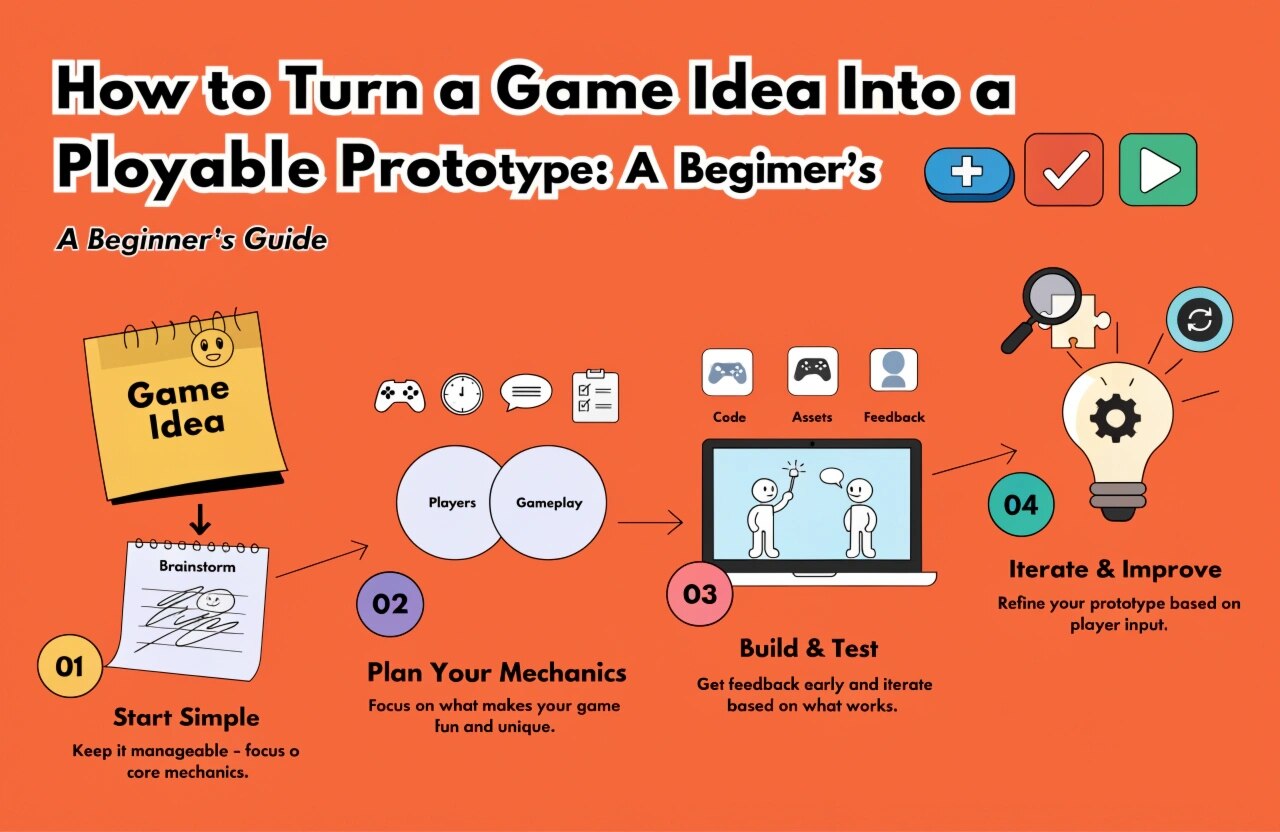
1. Define Your Core Game Idea
Before opening Unity, clearly define what your game is about.
Identify the genre, target audience, main objective, and unique gameplay feature. Ask yourself what players will do repeatedly and why they would enjoy doing it.
For example, if you are creating a 2D platformer, the essential experience might involve running, jumping, avoiding obstacles, and reaching a destination.
Write a short game concept document covering the gameplay loop, player controls, win and lose conditions, and intended platform.
Keep the concept focused. An MVP should demonstrate the most important idea rather than every feature planned for the final game.
2. Identify the Minimum Features
Create a list of potential features and separate essential functionality from optional additions.
For a simple platformer, essential features might include:
- Player movement and jumping
- Basic level geometry
- Collision detection
- Hazards or obstacles
- A win or restart condition
- Basic user interface
Features such as character customization, online multiplayer, achievements, complex enemy AI, and elaborate cinematics can usually wait.
This prioritization prevents scope creep and helps developers concentrate on the mechanics that determine whether the game is enjoyable.
3. Set Up Your Unity Project
Install a suitable Unity Editor version and create a project using the template that matches your game.
A 2D game generally benefits from a 2D template, while a three-dimensional game may require a 3D template.
Organize the project into folders such as:
- Scenes
- Scripts
- Prefabs
- Materials
- Sprites or Models
- Audio
- UI
- Tests
Create a basic gameplay scene and establish a consistent naming convention.
Good project organization makes rapid iteration easier and reduces confusion as the prototype grows.
4. Build the Core Gameplay Mechanics
The core mechanics are the foundation of your MVP. Implement them before spending time on visual polish.
In Unity, gameplay functionality is commonly built with GameObjects, Components, and C# scripts.
For example, a simple movement prototype may require a player GameObject, a movement script, collision components, and a camera that follows the player.
Focus on responsive controls, predictable movement, understandable objectives, and meaningful feedback.
Use placeholder shapes and basic physics where possible. A colored capsule can represent a character, while cubes can represent platforms or obstacles.
If the gameplay is not enjoyable with simple visuals, detailed artwork is unlikely to solve the underlying design problem.
5. Create a Small Playable Level
Design one compact level that demonstrates the main gameplay loop.
Avoid creating a large world before testing the fundamentals. A short level with a few carefully selected challenges can reveal more about the experience than a large, unfinished environment.
For example, introduce a basic mechanic first, then increase the difficulty gradually. This helps developers assess whether players understand the controls and can recognize the game's objectives.
Use Unity's Scene tools, prefabs, colliders, and lighting to construct the environment efficiently.
6. Use Placeholder Assets and Simple Audio
An MVP does not need production-quality graphics.
Start with primitive shapes, free or appropriately licensed assets, simple animations, and temporary sound effects. The objective is to communicate gameplay clearly while keeping development time under control.
However, placeholder assets should not make important gameplay elements difficult to understand. Players should be able to distinguish characters, hazards, interactive objects, and objectives.
Once the core mechanics have been validated, replace temporary assets selectively with polished visuals and audio.
7. Implement Basic UI and Game Flow
Even a small prototype needs a clear beginning, gameplay experience, and ending.
Include essential interface elements such as a start screen, score display where relevant, pause controls, a game-over screen, or a restart button.
For example, a survival game MVP might display a timer, show when the player loses, and allow another attempt immediately.
Simple UI makes the prototype easier to understand and enables testers to focus on the gameplay rather than figuring out how to operate the application.
8. Test the MVP with Real Players
Testing is one of the most important stages of MVP development.
Ask a small group of people from your intended audience to play the prototype without extensive instructions. Observe where they struggle, which mechanics they enjoy, and whether they understand the objective.
Collect feedback about controls, difficulty, pacing, bugs, and overall enjoyment.
Use this information to identify the highest-priority improvements. Avoid adding features simply because one tester requests them; look for recurring problems and evidence that supports meaningful changes.
9. Optimize Performance and Build a Testable Version
Even a prototype should run reliably on its intended target platform.
Check frame rate, loading time, input responsiveness, memory usage, and unexpected errors. Remove unused assets and avoid unnecessary processing in frequently executed scripts.
Test the game in the Unity Editor and create a standalone build for the intended platform, such as Windows, Android, or another supported target.
A standalone build helps reveal issues that may not be obvious during Editor testing.
10. Evaluate Results and Plan the Next Stage
After testing, compare the results with the original objectives.
Did players understand the core mechanic? Was the gameplay enjoyable? Were controls responsive? Did testers want to play again?
Use the answers to decide whether to refine the prototype, change the concept, or move toward full production.
A successful MVP does not need every planned feature. It needs enough evidence to show that the core game experience has potential.
Conclusion
Turning a game idea into a playable MVP using Unity is a practical way to validate gameplay before committing significant time and resources to full-scale production.
By defining the core concept, prioritizing essential mechanics, using placeholder assets, creating a small playable level, and testing with real players, developers can identify design problems early and make informed decisions about future development.
The key is to build small, test quickly, and improve based on evidence. A focused Unity MVP provides a foundation for better game design, more efficient development, and a clearer path from an initial idea to a polished gaming experience.
We build scalable web, mobile, and game products for clients worldwide — combining modern frameworks, cloud infrastructure, and best engineering practices.
.jpg)