Learn how frame pacing and input latency affect gameplay quality. Discover proven techniques to reduce lag, stabilize FPS, and deliver smooth, responsive gaming experiences.
In modern game development, performance is no longer measured solely by high frame rates. While achieving 60 FPS or even 120 FPS is important, consistency and responsiveness are what truly define a great player experience. This is where frame pacing and input latency play a crucial role.
Understanding and optimizing these two aspects can significantly improve how a game feels, especially in competitive or fast-paced environments.
What is Frame Pacing?
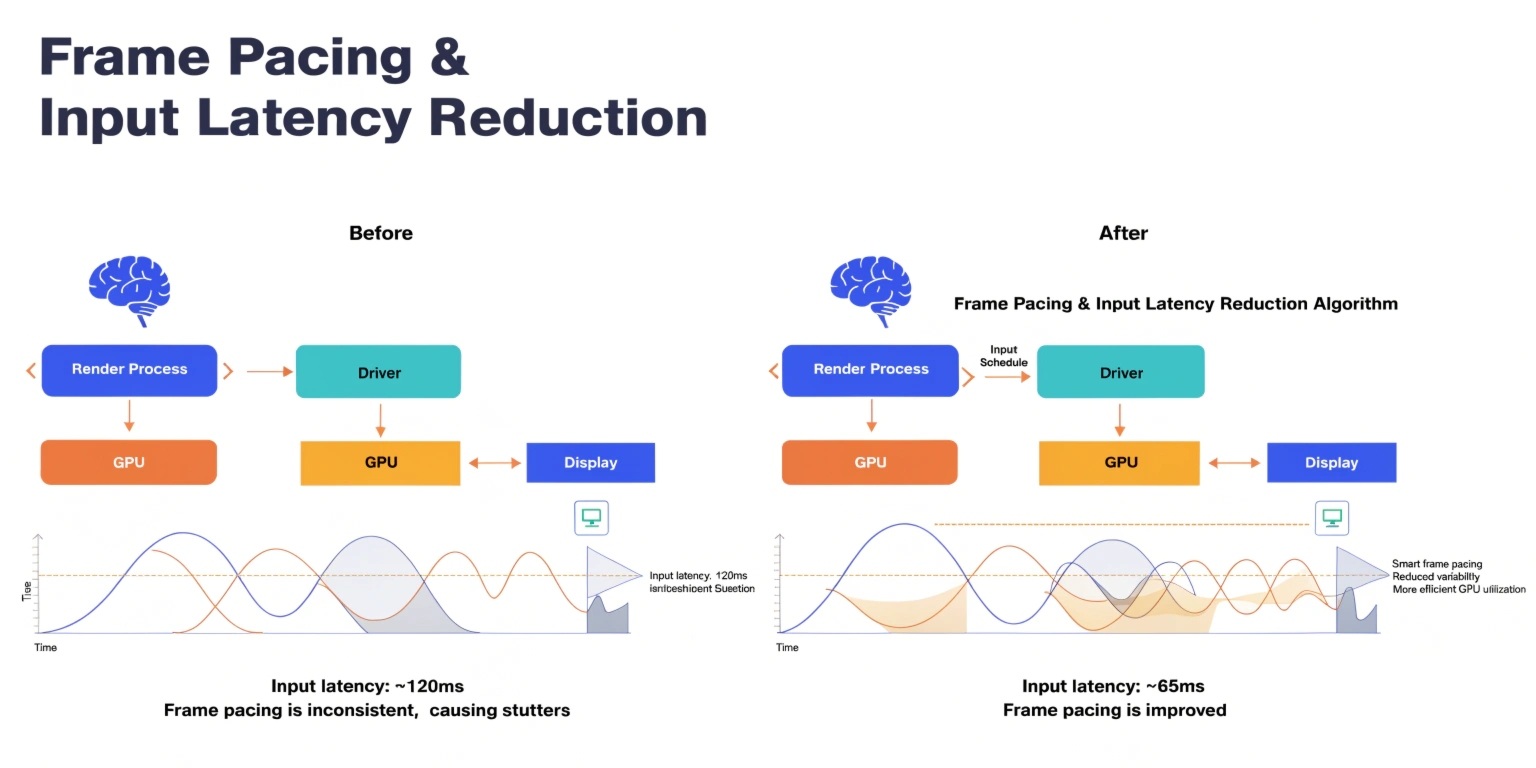
Frame pacing refers to the consistency of time intervals between rendered frames. Even if a game runs at a high average frame rate, inconsistent frame delivery can result in stuttering or uneven motion.
For example, if one frame takes 5 milliseconds and the next takes 25 milliseconds, the visual experience will feel choppy despite a seemingly high FPS counter.
Why it matters:
- Ensures smooth visual output
- Reduces micro-stuttering
- Improves perceived performance
Stable frame pacing is often more important than raw frame rate when it comes to user experience.
Understanding Input Latency
Input latency is the delay between a player’s action (such as pressing a key or moving a mouse) and the corresponding response on the screen.
This delay includes several stages:
- Input device processing
- CPU processing
- GPU rendering
- Display refresh
Why it matters:
- Critical for competitive gaming
- Affects responsiveness and control
- Impacts player satisfaction
Even a delay of a few milliseconds can make a noticeable difference in fast-paced games like shooters or racing titles.
Causes of Poor Frame Pacing
- Unoptimized Game Loops
- Irregular update cycles can cause inconsistent frame times.
- CPU-GPU Synchronization Issues
- When the CPU and GPU are not properly synchronized, frame delivery becomes uneven.
- Background Processes
- System interruptions or resource-heavy background tasks can disrupt rendering.
- Improper Use of VSync
- While VSync prevents screen tearing, it can introduce input lag and frame timing issues if not managed properly.
Causes of High Input Latency
- Render Queue Depth
- Too many frames queued for rendering increases delay.
- Low Refresh Rate Displays
- Displays with lower refresh rates inherently add latency.
- Heavy Graphics Processing
- Complex shaders, high-resolution textures, and post-processing effects increase render time.
- Inefficient Input Handling
- Delays in capturing or processing input events can add unnecessary lag.
Techniques to Improve Frame Pacing
1. Use Fixed or Semi-Fixed Time Steps
A consistent update loop helps maintain stable frame intervals.
2. Frame Time Smoothing
Implement algorithms that smooth out frame time spikes.
3. Optimize Resource Usage
Reduce CPU and GPU bottlenecks by profiling and optimizing heavy tasks.
4. Adaptive Sync Technologies
Technologies like G-Sync or FreeSync align display refresh rates with GPU output to eliminate stutter and tearing.
Techniques to Reduce Input Latency
1. Reduce Render Queue Length
Limiting the number of pre-rendered frames minimizes delay.
2. Implement Immediate Input Processing
Handle player input as early as possible in the frame pipeline.
3. Use Low-Latency APIs and Modes
Modern graphics APIs provide low-latency modes to reduce buffering.
4. Optimize Rendering Pipeline
Minimize unnecessary processing steps and streamline rendering tasks.
5. Increase Frame Rate
Higher frame rates naturally reduce input latency by shortening frame time.
Balancing Frame Pacing and Latency
Improving frame pacing and reducing input latency often involves trade-offs. For example, enabling VSync improves visual consistency but may increase input lag. Similarly, reducing graphics quality can improve responsiveness but impact visual fidelity.
Developers must find the right balance based on the type of game and target audience.
- Competitive games prioritize low latency
- Cinematic games prioritize visual smoothness
- Mobile games require balanced optimization due to hardware limits
Tools and Profiling Techniques
To effectively optimize performance, developers should use profiling tools to analyze frame timing and latency.
Key metrics to monitor include:
- Frame time consistency
- Input-to-display latency
- CPU and GPU usage
- Render queue length
By continuously profiling and testing across different hardware setups, developers can identify bottlenecks and refine performance.
Conclusion
Frame pacing and input latency are critical factors in delivering high-quality gaming experiences. While high FPS numbers look impressive, consistency and responsiveness define how a game truly feels to players.
By focusing on stable frame delivery, efficient input processing, and optimized rendering pipelines, developers can create smoother, more immersive, and highly responsive games. In today’s competitive gaming landscape, mastering these techniques is essential for standing out and ensuring player satisfaction.
We build scalable web, mobile, and game products for clients worldwide — combining modern frameworks, cloud infrastructure, and best engineering practices.
.jpg)