Understand the professional UI/UX design process, including research, planning, wireframing, prototyping, visual design, and usability testing. Discover how each stage helps businesses create intuitive, responsive, and engaging digital experiences.
Introduction
A successful website or mobile application is not just about attractive visuals. It is about creating a digital experience that helps users navigate easily, find information quickly, and complete their desired actions without confusion. This is where professional UI/UX design plays an important role.
UI (User Interface) design focuses on the visual elements of a digital product, including layouts, colors, typography, buttons, icons, and other interactive components. UX (User Experience) design focuses on how users interact with the product and how easily they can achieve their goals.
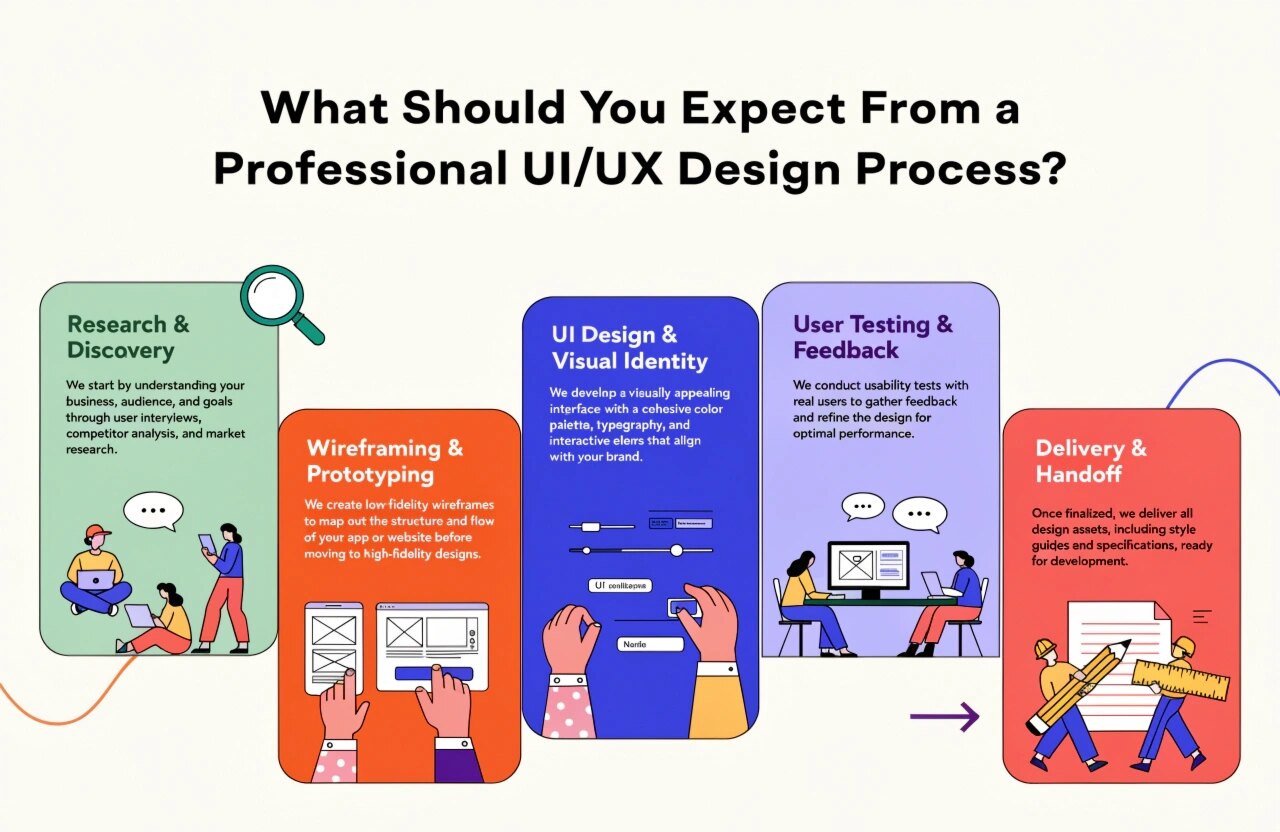
A professional UI/UX design process combines creativity, research, strategy, and testing to develop digital products that meet both user expectations and business objectives.
But what actually happens during this process? Let's explore the essential stages you should expect when working with a professional UI/UX design team.
1. Understanding Business Goals and Project Requirements
Every successful design project begins with understanding the business.
Before creating layouts or selecting colors, professional designers discuss the project's objectives, target audience, industry, and expected outcomes.
During this stage, the design team identifies:
- The primary purpose of the website or application.
- Target audience and customer expectations.
- Business goals and project requirements.
- Essential features and functionalities.
- Competitor websites or applications.
- Design preferences and brand guidelines.
For example, an e-commerce website may focus on product discovery, easy navigation, and a smooth checkout experience. In comparison, a business website may prioritize service information, credibility, and lead generation.
Understanding these requirements ensures that the final design supports the business rather than simply looking attractive.
2. User Research and Competitor Analysis
Once the project requirements are clear, the next step is understanding the people who will use the product.
User research helps designers understand customer behavior, preferences, challenges, and expectations. Instead of making assumptions, designers use research to make informed decisions.
Common research methods include:
- User interviews and surveys.
- Customer feedback analysis.
- User behavior research.
- Competitor website analysis.
- Market and industry research.
- Identification of user pain points.
Competitor analysis also helps identify successful design patterns, usability problems, and opportunities to differentiate the product.
For example, if users frequently abandon a registration process because it contains too many steps, designers can simplify the form and improve the overall experience.
This research creates a strong foundation for user-centered design.
3. Creating User Personas and User Journeys
After gathering research insights, designers organize the findings into user personas and journey maps.
User Personas: These are fictional representations of the target audience based on research. They include information such as user goals, interests, challenges, and behavior.
User Journey Maps: These illustrate the steps users take while interacting with a website or application, from their first interaction to completing a specific action.
For example, an online shopping journey may include:
- Visiting the website.
- Searching for a product.
- Comparing available options.
- Adding a product to the cart.
- Completing the payment.
- Receiving order confirmation.
Mapping these interactions helps designers identify unnecessary steps and improve navigation.
4. Wireframing and Information Architecture
Wireframing is one of the most important stages of the UI/UX design process.
A wireframe is a basic visual representation of a website or application screen. It focuses on structure, content placement, navigation, and functionality rather than final colors or visual styling.
During this stage, designers determine:
- Page layouts and screen structures.
- Navigation menus and content hierarchy.
- Placement of buttons and important elements.
- User interaction flows.
- Content organization.
- Overall application or website structure.
Wireframes can be created using tools such as Figma, Adobe XD, or other design applications.
The primary objective is to establish a clear layout before investing time in detailed visual design.
5. Creating Interactive Prototypes
Once the wireframes are approved, designers move toward prototyping.
A prototype represents how the actual website or application may function. Unlike static wireframes, interactive prototypes allow stakeholders to experience navigation, button interactions, screen transitions, and user flows.
Prototypes help businesses:
- Understand the proposed design before development.
- Review navigation and functionality.
- Identify potential usability issues.
- Share feedback with designers.
- Validate design concepts before implementation.
For example, a mobile application prototype can demonstrate how users move from the login screen to the dashboard and then to different features.
This stage reduces misunderstandings between designers, clients, and developers.
6. Visual UI Design and Brand Consistency
After the structure and interactions are finalized, designers focus on the visual appearance of the product.
This is where the user interface comes to life through colors, typography, illustrations, icons, spacing, and visual elements.
Professional UI designers focus on:
- Consistent color combinations.
- Readable typography.
- Proper spacing and alignment.
- Attractive buttons and icons.
- Clear visual hierarchy.
- Brand identity and consistency.
- Modern and clean layouts.
The design should reflect the company's brand identity while maintaining usability.
A professional design is not necessarily complicated. In many cases, simple layouts, clear typography, and consistent visual elements create a better user experience.
7. Responsive Design and Accessibility
Modern digital products must work smoothly across different devices and screen sizes.
Responsive design ensures that websites and applications provide a consistent experience on desktops, laptops, tablets, and smartphones.
Designers consider:
- Flexible layouts and screen dimensions.
- Mobile-friendly navigation.
- Readable text and appropriate spacing.
- Touch-friendly buttons and controls.
- Consistent experiences across devices.
Accessibility is equally important. Designers should consider sufficient color contrast, clear labels, keyboard navigation, readable content, and other accessibility practices.
Following accessibility guidelines such as WCAG helps make digital products more inclusive and usable for people with different needs.
8. Usability Testing and Design Improvements
Before handing the design over to developers, it is important to evaluate how users interact with it.
Usability testing helps identify navigation problems, confusing elements, and unnecessary interactions.
Design teams may conduct:
- User testing sessions.
- Prototype feedback reviews.
- Navigation testing.
- Task completion assessments.
- Accessibility checks.
- Design consistency reviews.
Based on the findings, designers make improvements to layouts, buttons, navigation, and user flows.
This process may involve multiple iterations because a professional design should be refined using feedback and testing rather than assumptions.
9. Developer Handoff and Design Documentation
Once the design is finalized and approved, it moves to the development team.
A professional UI/UX designer provides the necessary assets and documentation to help developers implement the design accurately.
The handoff typically includes:
- Final UI designs and approved screens.
- Design specifications and measurements.
- Color codes and typography details.
- Icons, images, and other assets.
- Interactive prototype references.
- Responsive design guidelines.
- Component and design system documentation.
Tools such as Figma make collaboration between designers and developers easier by providing access to design specifications and reusable components.
Clear communication during this stage helps minimize development errors and maintain design consistency.
10. Post-Launch Feedback and Continuous Optimization
The UI/UX design process does not necessarily end when a website or application goes live.
Real users may interact with the product differently than expected. Their feedback and behavior can reveal opportunities for improvement.
Businesses can monitor:
- User engagement and interaction.
- Conversion rates.
- Navigation patterns.
- Customer feedback.
- Form completion rates.
- Drop-off points.
Based on these insights, design teams can recommend updates, improve existing features, and optimize the overall user experience.
Continuous improvement helps digital products remain relevant as customer expectations and business requirements evolve.
Conclusion
A professional UI/UX design process involves much more than selecting attractive colors and creating visually appealing layouts. It requires a structured approach that includes business analysis, user research, wireframing, prototyping, visual design, usability testing, and developer collaboration.
Each stage contributes to building a digital product that is easy to use, visually consistent, responsive, and aligned with business objectives.
Whether you are planning a new website, redesigning an existing platform, or developing a mobile application, investing in professional UI/UX design can help improve user satisfaction, strengthen brand credibility, and create better digital experiences.
Looking to create a user-friendly website or mobile application? Daydreamsoft Infotech LLP provides professional web and application development solutions focused on delivering functional, modern, and engaging digital experiences.
We build scalable web, mobile, and game products for clients worldwide — combining modern frameworks, cloud infrastructure, and best engineering practices.