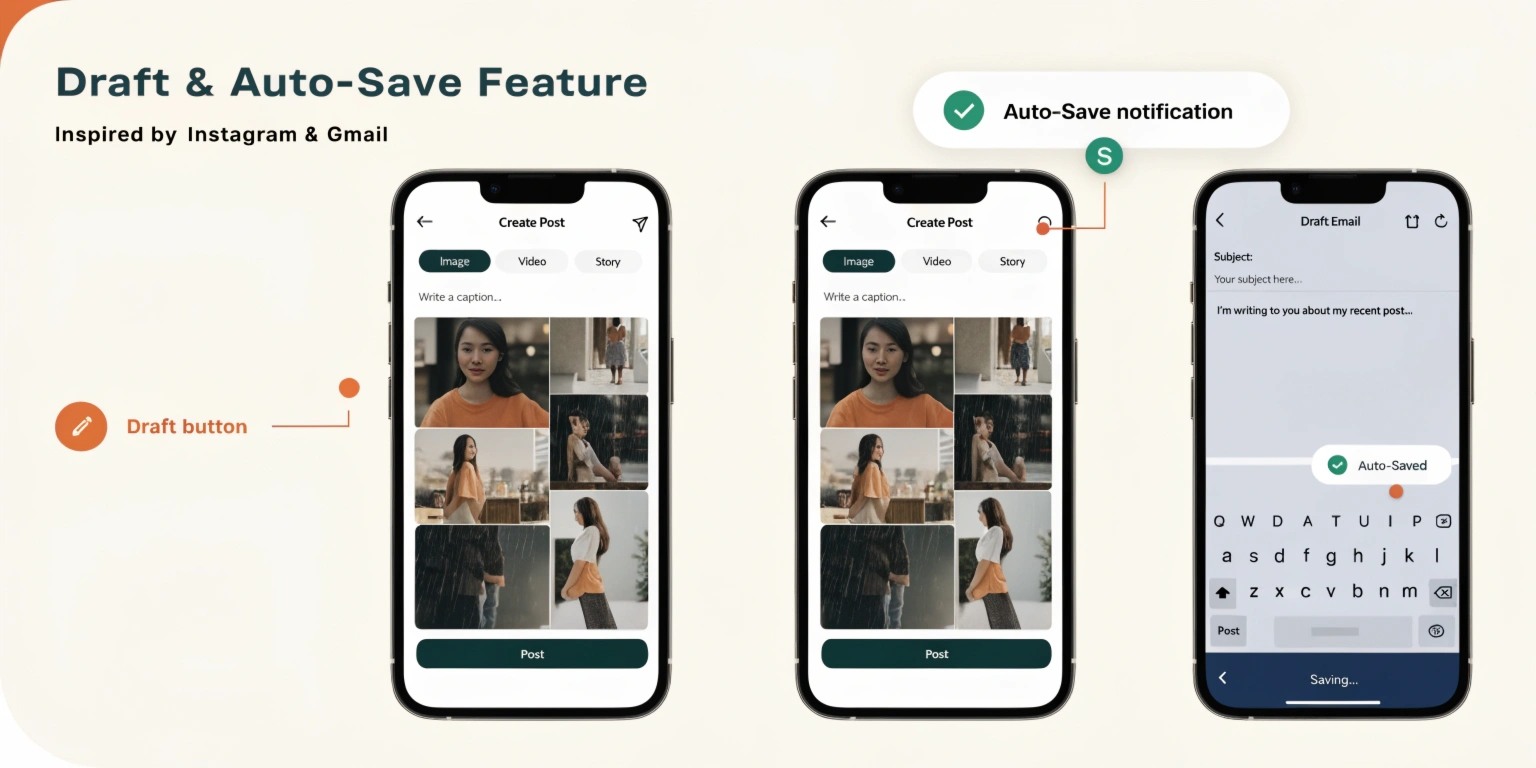
Discover how to build draft and auto-save features like Instagram and Gmail to enhance user experience, prevent data loss, and improve app reliability using modern development practices.
In today’s fast-paced digital world, users expect applications to be smart, reliable, and forgiving. One of the most appreciated features across modern apps is draft and auto-save functionality—popularized by platforms like Instagram and Gmail.
Whether users are composing an email, writing a post, or filling out a form, losing data due to accidental refreshes, crashes, or connectivity issues can be frustrating. Implementing a robust draft and auto-save system ensures that user input is preserved seamlessly.
What is Draft & Auto-Save?
Draft Saving allows users to manually or automatically store unfinished work so they can continue later.
Auto-Save is a background process that periodically saves user input without requiring any action.
Together, these features create a smooth and stress-free user experience by minimizing the risk of data loss.
Why This Feature Matters
1. Prevents Data Loss
Unexpected events like browser crashes, app closures, or network failures can erase user input. Auto-save ensures progress is preserved.
2. Enhances User Experience
Users feel more confident when they know their work is being saved automatically.
3. Improves Engagement
When users can return to drafts anytime, they are more likely to complete actions (emails, posts, purchases).
4. Builds Trust
Reliable saving mechanisms signal a well-designed and professional application.
Core Components of Draft & Auto-Save Systems
To implement this feature effectively, developers need to consider both frontend and backend components.
1. Frontend Detection
The system must detect changes in user input fields such as:
- Text areas
- Forms
- Editors
Event listeners (e.g., onChange, onInput) are commonly used to track updates.
2. Debounce Mechanism
Saving on every keystroke is inefficient. Instead, use a debounce technique:
- Wait for a short pause (e.g., 2–5 seconds) after user input
- Trigger save only when the user stops typing
This reduces unnecessary API calls and improves performance.
3. Local Storage (Client-Side Saving)
For quick recovery, data can be stored locally:
- Browser localStorage or sessionStorage
- Mobile app storage
This ensures data is not lost even if the network is unavailable.
4. Server-Side Storage
For long-term persistence and cross-device access:
- Save drafts in a database via APIs
- Associate drafts with user accounts
- Sync drafts across devices
This is how apps like Instagram and Gmail allow users to continue work on different devices.
Architecture Overview
A typical auto-save system works like this:
- User types content
- Frontend detects changes
- Debounce timer triggers save
- Data is sent to backend via API
- Backend stores draft in database
- Confirmation is returned (optional UI indicator like “Saved”)
This cycle repeats seamlessly in the background.
Key Implementation Techniques
1. Use Versioning
Maintain versions of drafts to prevent overwriting important data.
2. Auto-Save Indicators
Display feedback like:
- “Saving…”
- “Saved”
This reassures users that their work is محفوظ (safe).
3. Conflict Handling
If the same draft is edited on multiple devices, resolve conflicts using timestamps or last-write-wins strategy.
4. Offline Support
Store drafts locally and sync them when the connection is restored.
Example Use Cases
- Email Clients → Draft emails automatically saved
- Social Media Apps → Save unfinished posts or captions
- Form-Based Apps → Save partially completed forms
- Content Editors → Blog or document writing tools
These use cases highlight how universal and valuable this feature is.
Challenges in Implementation
Data Synchronization
Ensuring consistency between local and server data can be complex.
Performance Issues
Frequent saves can increase server load if not optimized.
Security Concerns
Sensitive data must be encrypted during storage and transmission.
Storage Management
Handling large volumes of draft data requires efficient cleanup strategies.
Best Practices
- Use debounce (2–5 seconds) for optimal performance
- Combine local and server storage for reliability
- Encrypt sensitive draft data
- Provide clear UI feedback
- Allow manual save as backup
- Clean up old or unused drafts periodically
The Future of Auto-Save
With advancements in cloud computing and AI, auto-save systems are becoming smarter. Future applications may:
- Predict user intent and save context intelligently
- Auto-complete drafts using AI suggestions
- Sync seamlessly across multiple platforms in real time
These innovations will further enhance productivity and user satisfaction.
Conclusion
Draft and auto-save features are no longer optional—they are essential for modern applications. Inspired by platforms like Instagram and Gmail, these systems ensure that users never lose their progress, regardless of interruptions.
By combining smart frontend logic, efficient backend storage, and thoughtful user experience design, developers can build reliable auto-save systems that users truly appreciate.
In a world where attention spans are short and interruptions are common, saving user progress automatically is not just a feature—it’s a necessity.
We build scalable web, mobile, and game products for clients worldwide — combining modern frameworks, cloud infrastructure, and best engineering practices.
.jpg)
.jpg)