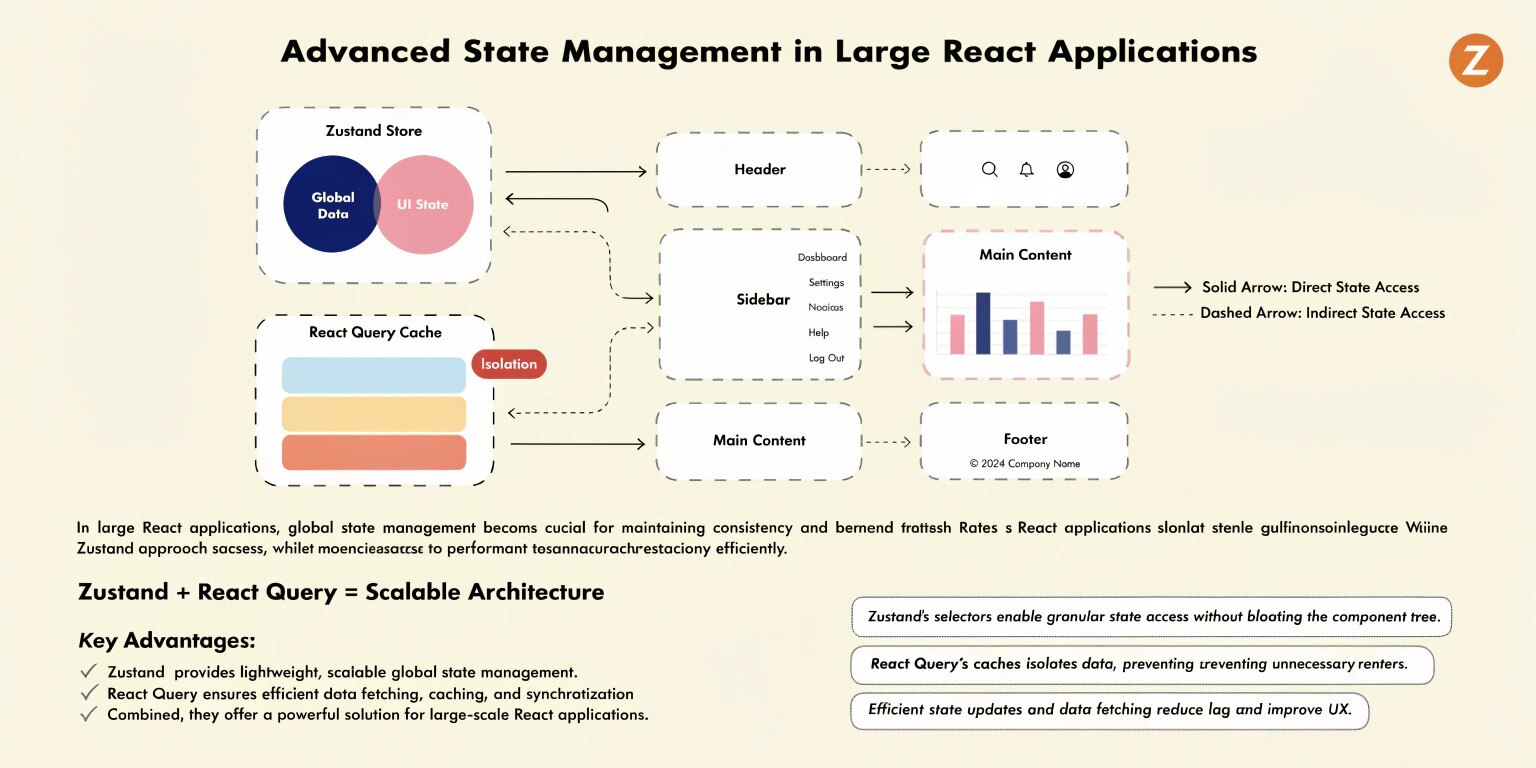
Large React applications require more than basic useState and Context. A scalable state architecture separates client and server state, controls data flow, minimizes re-renders, and uses appropriate tools for caching, persistence, synchronization, and complex business logic.
As React applications grow, managing application state becomes increasingly challenging. A small application may work perfectly with useState and useContext, but enterprise applications can contain hundreds of components, multiple business domains, asynchronous APIs, authentication flows, real-time updates, and complex user interactions.
At this scale, state management is not simply about choosing a library. It is an architectural decision that determines how data flows through the application, how components communicate, and how efficiently the application responds to changes.
A well-designed state architecture can improve performance, maintainability, testing, and developer productivity.
Understanding Different Types of State
One of the most important principles of advanced React state management is recognizing that not all state should be managed in the same way.
Common categories include:
Local UI State
This includes state that belongs to an individual component.
Examples include:
- Modal visibility
- Form input
- Dropdown state
- Tabs
- Temporary UI preferences
React's useState or useReducer is usually sufficient for this type of state.
Global Client State
This state may be required by multiple unrelated components.
Examples include:
- Authentication status
- Theme settings
- Shopping cart
- User preferences
- Application configuration
State-management libraries can be useful when this information becomes complex.
Server State
Server state represents data retrieved from backend services.
Examples include:
- User profiles
- Product catalogs
- Orders
- Notifications
- Analytics data
Server state has different requirements because it can become stale, requires caching, and may need background synchronization.
This is where tools such as TanStack Query can provide significant value.
Avoid the "Everything in Redux" Approach
A common mistake in large applications is placing every piece of information into a global store.
This creates unnecessary complexity.
For example, a temporary modal state probably does not need to exist in a global Redux store.
A better approach is to determine where the state naturally belongs.
A useful hierarchy is:
Component State → Feature State → Global Client State → Server State
Keep state as close as possible to where it is used.
This reduces dependencies and makes components easier to understand.
Redux Toolkit for Complex Applications
Redux remains useful for large applications with complex client-side state and strict data-flow requirements.
Redux Toolkit simplifies Redux development through features such as:
- Slices
- Reducers
- Actions
- Middleware
- Immutable update logic
- Async workflows
A large application can organize state around business domains rather than technical categories.
For example:
- auth
- users
- orders
- payments
- notifications
Each domain can have clearly defined actions, reducers, selectors, and tests.
This structure improves ownership and maintainability.
Using Selectors Effectively
Selectors are an important performance and architecture technique.
Instead of allowing components to access large sections of state directly, selectors expose the specific information they need.
For example, a component displaying a user's name does not necessarily need the entire user object or application state.
Well-designed selectors can:
- Reduce unnecessary renders
- Encapsulate state structure
- Improve reusability
- Simplify component logic
Memoized selectors can also prevent expensive calculations from being repeated unnecessarily.
Normalizing Complex Data
Large applications often manage deeply nested data.
For example, an application might store:
Company → Departments → Teams → Employees → Projects
Updating one employee could require modifying multiple nested structures.
State normalization stores entities separately and references them by identifiers.
Conceptually:
usersById
projectsById
teamsById
This approach reduces duplication and makes updates more predictable.
Normalized state is particularly useful for applications with relationships between many entities.
Server State With TanStack Query
Server data should not always be treated like ordinary application state.
TanStack Query provides mechanisms for:
- Fetching
- Caching
- Refetching
- Background synchronization
- Pagination
- Retry handling
- Query invalidation
Instead of manually storing API responses in a global client store, applications can allow a dedicated server-state library to manage them.
This can significantly simplify data-fetching logic.
Context API: Use It Carefully
React Context is useful for sharing relatively stable values across a component tree.
Good examples include:
- Theme
- Localization
- Authentication context
- Configuration
However, putting frequently changing large objects into Context can cause unnecessary component updates.
For high-frequency or highly granular state, specialized state-management solutions may provide better performance.
Zustand for Lightweight Global State
Zustand is another option for applications that need global client state without the structure of Redux.
It provides a relatively simple store-based model and allows components to subscribe to specific state slices.
It can be useful for:
- UI state
- Lightweight application state
- User preferences
- Multi-step workflows
- Feature-specific stores
The choice between Redux Toolkit, Zustand, Context, and other approaches should depend on application requirements rather than popularity.
Managing Asynchronous State
Asynchronous operations create additional complexity.
Applications may need to represent:
- Loading
- Success
- Error
- Retry
- Empty results
- Partial data
Rather than scattering asynchronous logic throughout components, centralizing these patterns can improve consistency.
Custom hooks can provide reusable interfaces such as:
useUserProfile()
useOrders()
useNotifications()
This keeps components focused on presentation and user interaction.
Optimistic Updates
Optimistic updates improve perceived application speed by updating the interface before the server confirms the operation.
For example, when a user likes a post, the UI can immediately display the new like count.
If the backend request fails, the application can roll back the change.
Optimistic updates require careful handling of:
- Temporary state
- Error recovery
- Rollbacks
- Concurrent updates
- Server synchronization
They are particularly valuable in interactive applications where responsiveness is important.
Persistence and Offline State
Some applications need state to survive page refreshes or temporary network interruptions.
Examples include:
- Shopping carts
- Draft documents
- User preferences
- Offline workflows
Persistence can be implemented using browser storage or specialized persistence mechanisms.
However, sensitive information should not be stored in client-side storage without appropriate security considerations.
Real-Time State
Applications such as collaboration tools, dashboards, and messaging platforms may receive continuous updates through WebSockets or other real-time technologies.
The state architecture should determine how incoming updates interact with existing cached or local data.
Poorly designed real-time synchronization can result in:
- Stale information
- Duplicate updates
- Race conditions
- Conflicting changes
Event-driven approaches and clearly defined update contracts can help manage these challenges.
Performance Optimization
State changes can trigger React renders, so large applications should carefully manage subscriptions.
Important techniques include:
- Selecting only required state
- Memoizing expensive calculations
- Avoiding unnecessary Context updates
- Splitting large components
- Keeping state local when possible
- Using stable references
- Virtualizing large lists
Performance optimization should be guided by profiling rather than assumptions.
State Ownership and Feature Architecture
A scalable application should clearly define who owns each piece of state.
Feature-based architecture can help organize state around business capabilities.
For example:
features/
authentication/
products/
checkout/
orders/
notifications/
Each feature can contain its:
- Components
- Hooks
- API logic
- State
- Selectors
- Tests
This reduces cross-feature coupling and makes large codebases easier to navigate.
Testing State Management
State logic should be independently testable.
Important scenarios include:
- Initial state
- State transitions
- API failures
- Optimistic updates
- Rollbacks
- Cache invalidation
- Permission changes
Pure reducers and selectors are particularly easy to test because their behavior can be validated without rendering entire components.
Common State Management Mistakes
Large React applications often encounter problems because of:
- Excessive global state
- Duplicated server data
- Overuse of Context
- Poor state ownership
- Deeply nested state
- Unnecessary re-renders
- Business logic inside components
- Lack of clear data-fetching patterns
The solution is usually architectural rather than simply adding another library.
Choosing the Right Strategy
There is no universal state-management solution.
A practical approach might look like:
RequirementSuitable ApproachLocal UI stateuseStateComplex local logicuseReducerShared stable valuesContextComplex global client stateRedux ToolkitLightweight global stateZustandServer/API stateTanStack QueryComplex derived dataSelectorsOffline workflowsPersistence layer
The goal is to use the simplest tool that satisfies the requirement.
Conclusion
Advanced state management in large React applications is fundamentally about separation of concerns. Local UI state, global client state, and server state have different characteristics and should not automatically be managed using the same mechanism.
By combining appropriate tools such as Redux Toolkit, Zustand, Context, and TanStack Query with architectural patterns like normalized state, selectors, feature-based organization, optimistic updates, and careful state ownership, development teams can create React applications that remain maintainable as they grow.
The best state-management architecture is not the one with the most sophisticated library. It is the one that keeps data predictable, components focused, performance measurable, and business logic easy to evolve.
We build scalable web, mobile, and game products for clients worldwide — combining modern frameworks, cloud infrastructure, and best engineering practices.
.jpg)
.jpg)
.jpg)